We’ve reached the point where nearly all the core systems required for our roguelike have been put in place, albeit with significant enhancement still to come. This step will be light on architecture and focus more on implementation, specifically procedural dungeon generation facilitated by a new DungeonGenerator class. We’re adapting the exact dungeon generation algorithm used in part 3 of the TCOD tutorial, so if you’ve gone through that in the past much of this may look familiar.
Let’s look at the architecture:
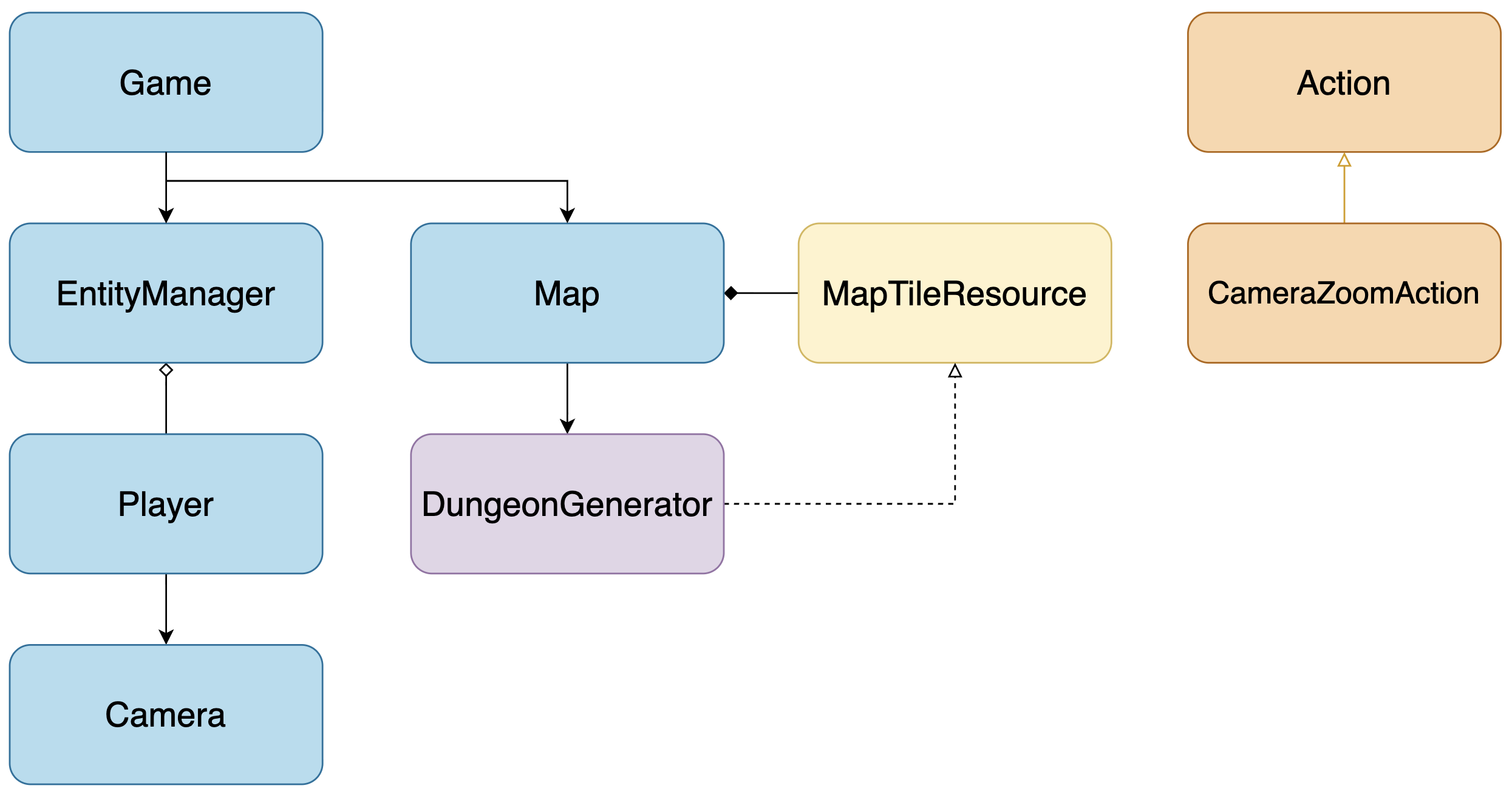
The primary focus of this part will be the DungeonGenerator. There is no need for it to exist in the scene tree, so we’ll let Godot implicitly inherit it from the RefCounted class 1 (similar to Actions, which we explicitly inherited from RefCounted). The DungeonGenerator will need to know about the MapTileResources we defined in the last part (the dotted line on the diagram denotes a dependency2 in UML), but the tile data will live in and be controlled by the Map node (as indicated by the diamond symbol on the line from Map to MapTileResource, which denotes a composition3).
To give our player a larger dungeon to explore, we’re going to increase the size of the game world. To make that easier to see as we build our dungeon, we’ll programmatically attach a Camera2D node to the Player node. The Camera2D will be able to zoom in to our current viewport, or zoom out to show the entire dungeon. Camera zoom will be controlled by a new CameraZoomAction.
The code for this part can be found at https://github.com/alexshopov/godot-roguelike-basic-set/tree/part-4.
Creating a Room
We’ll start by giving the dungeon a darker background. This will be more important in the next part, but doing it now will make our rooms stand out more against the viewport.
Change Project Settings -> Environment -> Default Clear Color to black.
Create a new script called map/dungeon_generator.gd and add the following code:
class_name DungeonGeneratorenum MapTileType { FLOOR_1, FLOOR_2, WALL}const MAP_TILE_RESOURCES := { MapTileType.FLOOR_1: preload("res://data/map_tiles/floor_1.tres"), MapTileType.FLOOR_2: preload("res://data/map_tiles/floor_2.tres"), MapTileType.WALL : preload("res://data/map_tiles/wall.tres")}var origin: Vector2ivar _parent: Mapfunc _init(map: Map) -> void: _parent = map func generate() -> void: _parent.clear_map() var rooms: Array[Rect2i] rooms.append(_rectangular_room(Rect2i(5, 5, 10, 15))) rooms.append(_rectangular_room(Rect2i(20, 5, 10, 15))) origin = rooms[0].get_center()func _rectangular_room(new_bounds: Rect2i) -> Rect2i: var bounds := new_bounds # inset the room position by 1 so it doesn't share a wall with any other rooms bounds.position += Vector2i.ONE var tile : Vector2i for x in range(bounds.position.x, bounds.end.x): for y in range(bounds.position.y, bounds.end.y): tile = Vector2i(x, y) _set_floor_tile(tile) return boundsfunc _set_floor_tile(tile: Vector2i) -> void: var tile_resource: MapTileResource # randomize which floor tile is placed to give us some visual variety if randf() < 0.85: tile_resource = MAP_TILE_RESOURCES.get(MapTileType.FLOOR_1) else: tile_resource = MAP_TILE_RESOURCES.get(MapTileType.FLOOR_2) _parent.tiles.set(tile, tile_resource) _parent.set_cell(tile, _parent.source_id, tile_resource.atlas_coord)
We start by defining the DungeonGenerator. We’re not explicitly using the extends keyword, so Godot will implicitly extend DungeonGenerator from RefCounted.. We’ll move the MapTileType enum and MAP_TILE_RESOURCES dictionary over from the Map class, as the DungeonGenerator is now taking responsibility for attaching these resources to the appropriate map tiles.
class_name DungeonGeneratorenum MapTileType { FLOOR_1, FLOOR_2, WALL}const MAP_TILE_RESOURCES := { MapTileType.FLOOR_1: preload("res://data/map_tiles/floor_1.tres"), MapTileType.FLOOR_2: preload("res://data/map_tiles/floor_2.tres"), MapTileType.WALL : preload("res://data/map_tiles/wall.tres")}
The DungeonGenerator isn’t part of the scene tree, but it still needs to know what its parent Map is. No one else needs to know about the parent Map, so we define is as a private variable (denoted by the leading underscore) and give it a value in the _init method. We’ll also define the origin as a public variable, as we’ll be referencing this from the parent Map class a little later.
var origin: Vector2ivar _parent: Mapfunc _init(map: Map) -> void: _parent = map
The generate method is the core of the DungeonGenerator class where all the real work is done. We’re going to build up our dungeon generator step by step, beginning with just two simple rooms.
We start by calling the parent Map‘s clear_map method (which will be described below). Our dungeon rooms are modeled as Godot Rect2i objects4. We’ll define a private _rectangular_room method which takes as a parameter a Rect2i, defined using its x position, y position, width, and height. Two rooms are created and stored in an array. We’ll set the DungeonGenerator -> origin to the center of the first room.
The _rectangular_room method traverses the inner area of the provided Rect2i and sets the floor tiles at each point. Why are we adding Vector2.ONE to the bounds.position of the provided Rect2i? I can’t provide a better explanation than the TCOD tutorial did, so I’ll quote a section of https://rogueliketutorials.com/tutorials/tcod/v2/part-3/ here:
What’s with the + 1 on [bounds.position.x] and
[bounds.position.y]? Think about what we’re saying when we tell our program that we want a room at coordinates (1, 1) that goes to (6, 6). You might assume that would carve out a room like this one (remember that lists are 0-indexed, so (0, 0) is a wall in this case):0 1 2 3 4 5 6 7 0 # # # # # # # # 1 # . . . . . . # 2 # . . . . . . # 3 # . . . . . . # 4 # . . . . . . # 5 # . . . . . . # 6 # . . . . . . # 7 # # # # # # # #That’s all fine and good, but what happens if we put a room right next to it? Let’s say this room starts at (7, 1) and goes to (9, 6)
  0 1 2 3 4 5 6 7 8 9 10
0 # # # # # # # # # # #
1 # . . . . . . . . . #
2 # . . . . . . . . . #
3 # . . . . . . . . . #
4 # . . . . . . . . . #
5 # . . . . . . . . . #
6 # . . . . . . . . . #
7 # # # # # # # # # # #
There’s no wall separating the two! That means that if two rooms are one right next to the other, then there won’t be a wall between them! So long story short, our function needs to take the walls into account when digging out a room. So if we have a rectangle with coordinates x1 = 1, x2 = 6, y1 = 1, and y2 = 6, then the room should actually look like this:
  0 1 2 3 4 5 6 7
0 # # # # # # # #
1 # # # # # # # #
2 # # . . . . # #
3 # # . . . . # #
4 # # . . . . # #
5 # # . . . . # #
6 # # # # # # # #
7 # # # # # # # #
This ensures that we’ll always have at least a one tile wide wall between our rooms, unless we choose to create overlapping rooms. In order to accomplish this, we add + 1 to x1 and y1.
func generate() -> void: _parent.clear_map() var rooms: Array[Rect2i] rooms.append(_rectangular_room(Rect2i(5, 5, 10, 15))) rooms.append(_rectangular_room(Rect2i(20, 5, 10, 15))) origin = rooms[0].get_center()func _rectangular_room(new_bounds: Rect2i) -> Rect2i: var bounds := new_bounds # inset the room position by 1 so it doesn't share a wall with any other rooms bounds.position += Vector2i.ONE var tile : Vector2i for x in range(bounds.position.x, bounds.end.x): for y in range(bounds.position.y, bounds.end.y): tile = Vector2i(x, y) _set_floor_tile(tile) return bounds
The _set_floor_tiles method is nothing more than a copy + paste of the floor tile code in map/map.gd.
func _set_floor_tile(tile: Vector2i) -> void: var tile_resource: MapTileResource # randomize which floor tile is placed to give us some visual variety if randf() < 0.85: tile_resource = MAP_TILE_RESOURCES.get(MapTileType.FLOOR_1) else: tile_resource = MAP_TILE_RESOURCES.get(MapTileType.FLOOR_2) _parent.tiles.set(tile, tile_resource) _parent.set_cell(tile, _parent.source_id, tile_resource.atlas_coord)
We’ve moved a lot of logic out of map/map.gd and into map/dungeon_generator.gd. Let’s clean up map/map.gd and set up the DungeonGenerator. Make the following changes to map/map.gd:
class_name Mapextends TileMapLayer-enum MapTileType {- FLOOR_1,- FLOOR_2,- WALL-}-const MAP_TILE_RESOURCES := {- MapTileType.FLOOR_1: preload("res://data/map_tiles/floor_1.tres"),- MapTileType.FLOOR_2: preload("res://data/map_tiles/floor_2.tres"),- MapTileType.WALL : preload("res://data/map_tiles/wall.tres")-}+var origin : Vector2i : + get():+ return dungeon_generator.originvar map_size : Vector2ivar tiles : Dictionary[Vector2i, MapTileResource] = {}+@onready var dungeon_generator : DungeonGenerator = DungeonGenerator.new(self)func init(new_map_size: Vector2i) -> void: map_size = new_map_size+ dungeon_generator.generate()- var tile : Vector2- var tile_resource: MapTileResource- for x: int in range(map_size.x):- for y: int in range(map_size.y):- tile = Vector2(x, y)- if randf() < 0.85:- tile_resource = MAP_TILE_RESOURCES.get(MapTileType.FLOOR_1)- else:- tile_resource = MAP_TILE_RESOURCES.get(MapTileType.FLOOR_2)- tiles.set(tile, tile_resource)- set_cell(tile, source_id, tile_resource.atlas_coord)- for x: int in range(10, 15):- tile = Vector2i(x, 8)- tile_resource = MAP_TILE_RESOURCES.get(MapTileType.WALL)- tiles.set(tile, tile_resource)- set_cell(tile, source_id, tile_resource.atlas_coord)+func clear_map() -> void:+ tiles.clear()+ clear()...+func load(save_data: Dictionary) -> void:+ clear_map()
We’ll need to know the origin of the dungeon when we place our Player in the scene. For simplicity, we’ll define an origin variable on the Map that uses a getter function5 to return the DungeonGenerator -> origin.
+var origin : Vector2i : + get():+ return dungeon_generator.origin
Let’s place our Player at the Map -> origin. Open game/game.gd and make the following changes:
func _ready() -> void: ... map.init(GAME_SIZE)- @warning_ignore("integer_division")- var center := GAME_SIZE / 2- entity_manager.init(center)+ entity_manager.init(map.origin)
The clear_map method is used to clear both the tiles Dictionary, as well as the tiles rendered by the parent TileMapLayer. We’re invoking this in the DungeonGenerator, and we’ll also call it to give us a blank slate before loading map data from a saved game.
+func clear_map() -> void:+ tiles.clear()+ clear()...+func load(save_data: Dictionary) -> void:+ clear_map()
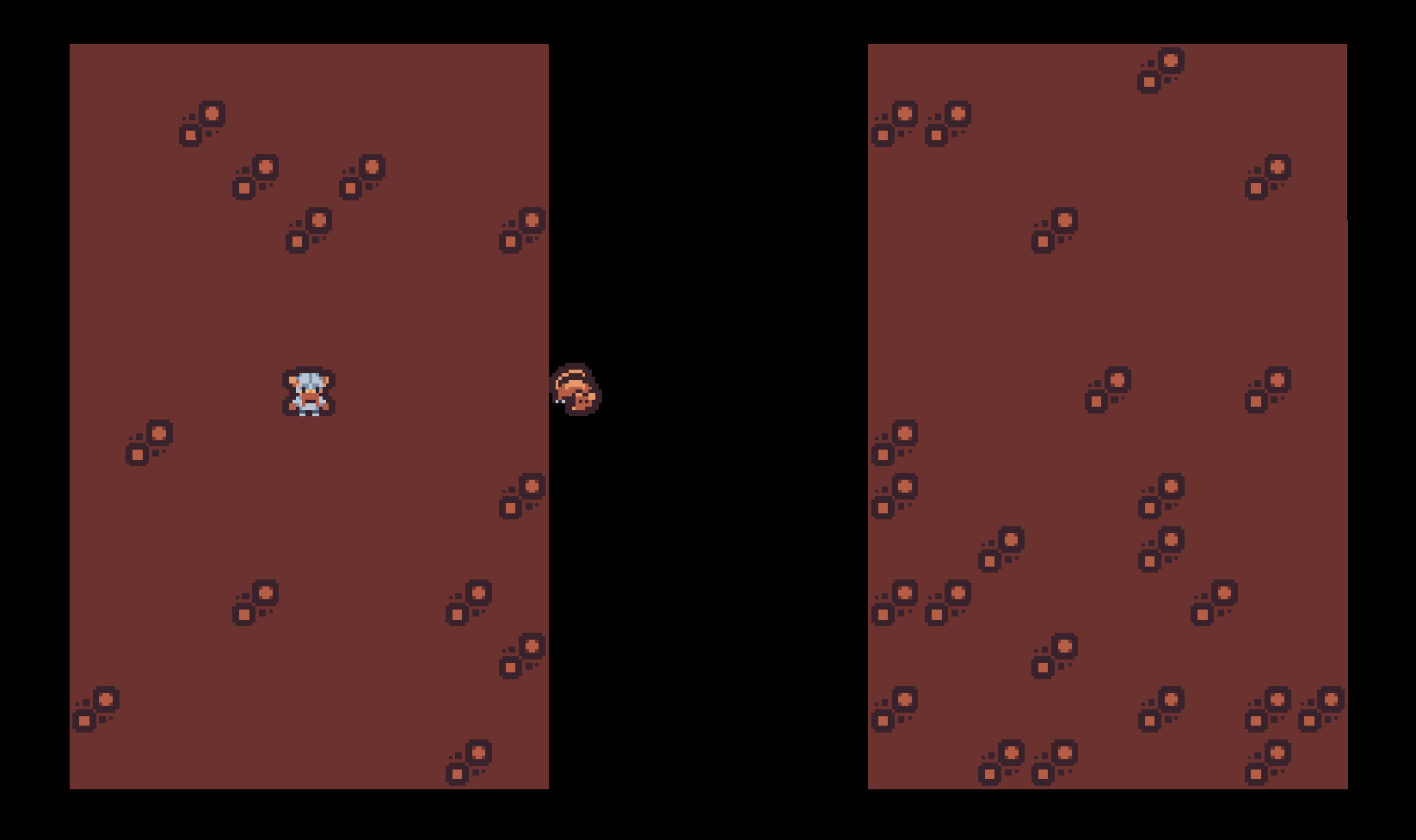
Run the game and confirm that everything works. You should see two rooms with some variation in the floor tiles. The Player should be in the center of one room and able to move freely about within its bounds.The unfortunate npc, on the other hand, is stuck in the void between rooms.
Connecting Rooms with Tunnels
With our rooms in place, let’s add some code to connect them with a tunnel. Add the following _tunnel_between method and method call to map/dungeon_generator.gd:
func generate() -> void: ... rooms.append(_rectangular_room(Rect2i(5, 5, 10, 15))) rooms.append(_rectangular_room(Rect2i(20, 5, 10, 15)))+ _tunnel_between(rooms[0].get_center(), rooms[1].get_center()) origin = rooms[0].get_center()func _rectangular_room(bounds: Rect2i) -> Rect2i: ... return bounds +func _tunnel_between(start: Vector2i, end: Vector2i) -> void:+ var corner : Vector2i+ # horizontal then vertical+ if randf() < 0.5:+ corner = Vector2i(end.x, start.y)+ # vertical then horizontal+ else:+ corner = Vector2i(start.x, end.y)+ var tiles := Geometry2D.bresenham_line(start, corner) + Geometry2D.bresenham_line(corner, end)+ for tile in tiles:+ _set_floor_tile(tile)
_tunnel_between takes a start and end point and draws an L-shaped tunnel between them. Our tunnel has a 50/50 chance of being comprised of horizontal-then-vertical vs vertical-then-horizontal segments.
+ # horizontal then vertical+ if randf() < 0.5:+ corner = Vector2i(end.x, start.y)+ # vertical then horizontal+ else:+ corner = Vector2i(start.x, end.y)
The actual tiles of the tunnel segments are determined using a famous algorithm called Bresenham’s line6, a method for determining the points necessary to approximate a straight-line between two points. Godot’s Geometry2D helper class exposes an implementation of Bresenham’s line, so we call that directly to create our horizontal and vertical tunnel sections.
Challenge: if you’re so inclined, refer to the wiki page linked in the References and try creating your own implementation of Bresenham’s line and use it instead of the Godot implementation.
+ var tiles := Geometry2D.bresenham_line(start, corner) + Geometry2D.bresenham_line(corner, end)
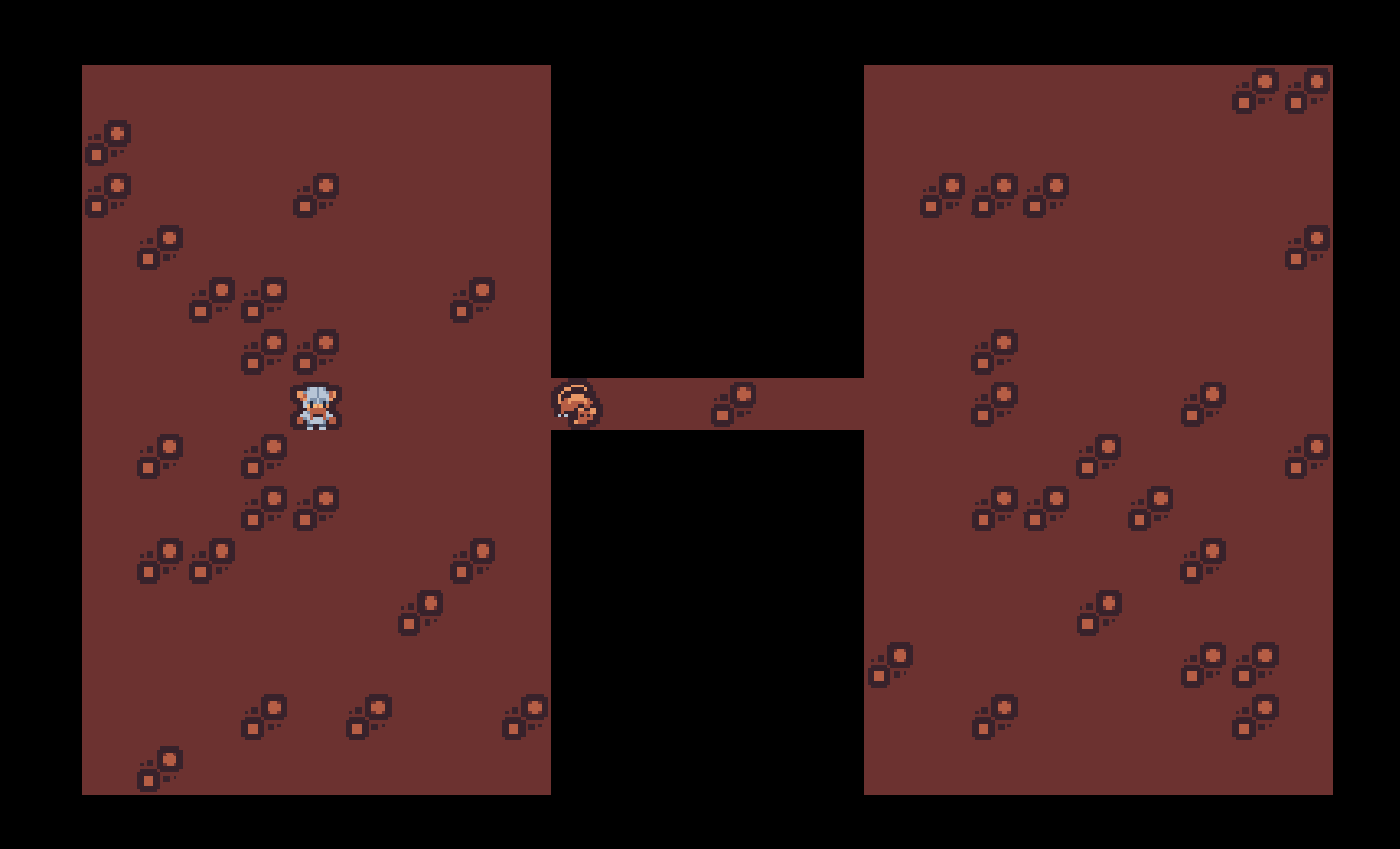
Run the game and admire the tunnel connecting the two rooms. Our npc is thankful to be back on regular ground.
Dungeon Generation
With a functioning room and tunnel generator, we’re ready to create the actual dungeon. Let’s start by specifying some details about the number and size of our rooms. Open map/map.gd and add the following export variables:
class_name Mapextends TileMapLayer+@export var room_max_size : int = 10+@export var room_min_size : int = 6+@export var max_rooms : int = 30
Open map/dungeon_generator.gd. Start by deleting the room generation test code:
func generate() -> void: _parent.clear_map() var rooms: Array[Rect2i] = []- rooms.append(_rectangular_room(Rect2i(5, 5, 10, 15)))- rooms.append(_rectangular_room(Rect2i(20, 5, 10, 15)))- _tunnel_between(rooms[0].get_center(), rooms[1].get_center())- origin = rooms[0].get_center()
Then add the dungeon generation code:
func generate() -> void: _parent.clear_map() var rooms: Array[Rect2i] = []+ for r: int in range(_parent.max_rooms):+ var room_width := randi_range(_parent.room_min_size, _parent.room_max_size)+ var room_height := randi_range(_parent.room_min_size, _parent.room_max_size)+ var x := randi_range(0, _parent.map_size.x - room_width - 1)+ var y := randi_range(0, _parent.map_size.y - room_height - 1)+ # define the formal bounds of the room as a Rect2i+ var room_bounds := Rect2i(x, y, room_width, room_height)+ # check if any rooms intersect with this one+ if rooms.any(func(other_room: Rect2i) -> bool: return room_bounds.intersects(other_room)):+ # the new room intersects, so try again+ continue+ var new_room := _rectangular_room(room_bounds)+ if rooms.size() == 0:+ # the first room will be the player's start position+ origin = new_room.get_center()+ else:+ # use a tunnel to connect this room to the previous room+ _tunnel_between(rooms[-1].get_center(), new_room.get_center())+ rooms.append(new_room)
For each iteration of the loop, we randomly generate the width and height of a new room, as well as the room’s (x, y) origin. We encapsulate these values in a new Rect2i object.
+ for r: int in range(_parent.max_rooms):+ var room_width := randi_range(_parent.room_min_size, _parent.room_max_size)+ var room_height := randi_range(_parent.room_min_size, _parent.room_max_size)+ var x := randi_range(0, _parent.map_size.x - room_width - 1)+ var y := randi_range(0, _parent.map_size.y - room_height - 1)+ # define the formal bounds of the room as a Rect2i+ var room_bounds := Rect2i(x, y, room_width, room_height)
With the bounds of the new room defined, we check if it intersects the bounds of any existing rooms. If it does, we abandon the new room and restart the loop. If the new room does not intersect, we call the _rectangular_room function.
+ # check if any rooms intersect with this one+ if rooms.any(func(other_room: Rect2i) -> bool:return room_bounds.intersects(other_room)):+ # the new room intersects, so try again+ continue+ var new_room := _rectangular_room(room_bounds)
If this is the first room added to the dungeon, we’ll consider it the dungeon origin. Recall that we use this value to set the Player‘s starting position. Otherwise, we call the _tunnel_between method to connect the new room to the last room in the rooms Array. Either way, we end by appending new_room to the rooms array.
+ if rooms.size() == 0:+ # the first room will be the player's start position+ origin = new_room.get_center()+ else:+ # use a tunnel to connect this room to the previous room+ _tunnel_between(rooms[-1].get_center(), new_room.get_center())+ rooms.append(new_room)
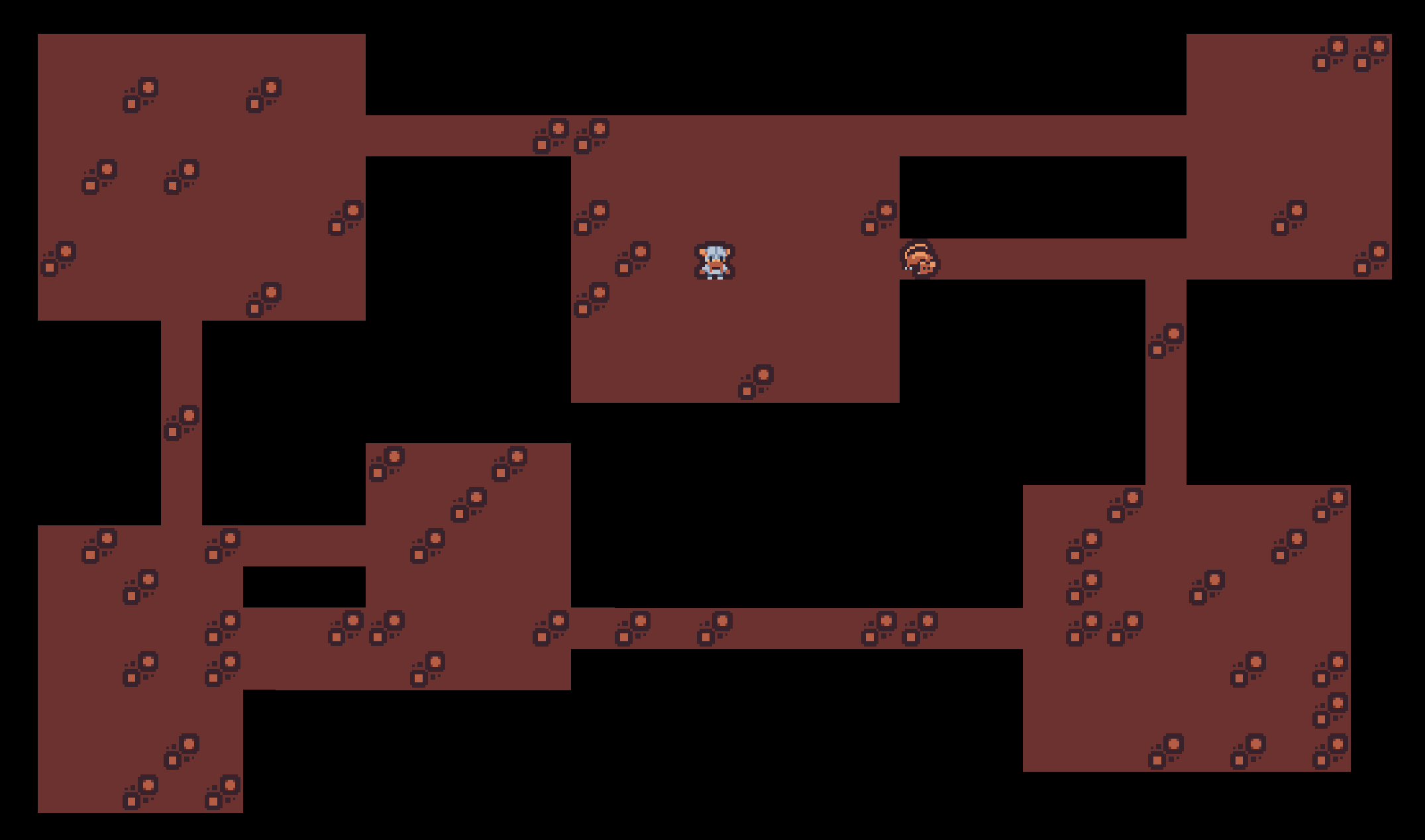
Run the game and you should find yourself with a fun (if lifeless) mini dungeon to explore. Depending on the room layout, the npc may still be trapped in the void between rooms.
Increasing the Dungeon Size
With our dungeon generator in place, let’s increase the size of the dungeon we can explore. Start by opening game/game.gd and setting a new GAME_SIZE:
class_name Gameextends Node-const GAME_SIZE := Vector2i(40, 22)+const GAME_SIZE := Vector2i(80, 45)
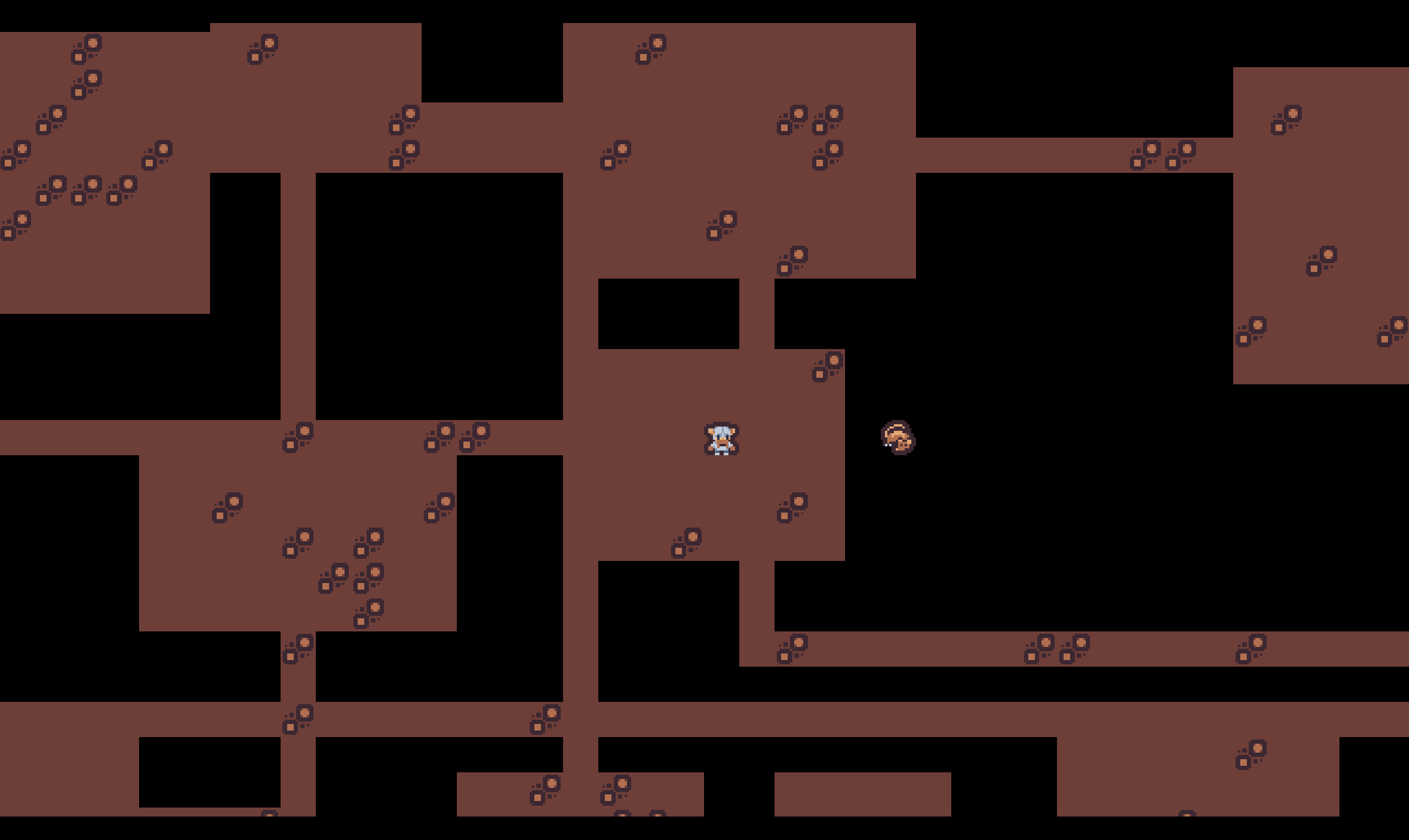
If you run the game now, you’ll find that while the dungeon extends well outside the viewport, the viewport itself is stationary as the Player moves around. If we want to explore the whole dungeon, we need to update which part of the dungeon we’re seeing. We’ll do this by adding a camera to our scene.
Open entities/entity_manager.gd and add a Camera2D as a child of Player.
func init(origin: Vector2i) -> void: player = _spawn_entity(ENTITY_RESOURCES.get("player")) player.global_position = origin * Constants.TILE_SIZE+ var camera := Camera2D.new()+ camera.name = "camera"+ player.add_child(camera)
Run the game again, and explore the bigger dungeon.
Camera Zoom
Our viewport is limited to ~1/4 of the total dungeon area. If we want to see the whole dungeon on the screen, we’ll need to add the capability of zooming out the camera.
Open Project Settings -> Input Map and add a new action called camera_zoom. Map it to the z key.
Create a new script called actions/camera_zoom_action.gd and add the following code:
class_name CameraZoomActionextends Actionfunc execute(game: Game) -> void: var player: Entity = game.entity_manager.player var camera: Camera2D = player.get_node_or_null("camera") if not camera: return if camera.zoom == Vector2.ONE: camera.global_position = (game.GAME_SIZE / 2) * Constants.TILE_SIZE camera.zoom = Vector2(0.5, 0.5) else: camera.global_position = player.global_position camera.zoom = Vector2.ONE
We first validate that the camera exists. If it doesn’t for whatever reason, this action has nothing more to do.
func execute(game: Game) -> void: var player: Entity = game.entity_manager.player var camera: Camera2D = player.get_node_or_null("camera") if not camera: return
The camera has a default zoom value of (1, 1), centered on the Player position (because camera is a child of Player). To show the entire dungeon, we place the camera in the center of game world, and zoom out 50% in both x and y.
Note: recall that dividing game.GAME_SIZE / 2 will trigger an integer division warning. We’ve already covered that, so we’re not going to explicitly include the @ignore_warning annotation in the code anymore. Feel free to continue to include it, or silence the warning completely by setting Project Settings -> GDScript -> Integer Division to Ignore .
	if camera.zoom == Vector2.ONE:
		camera.global_position = (game.GAME_SIZE / 2) * Constants.TILE_SIZE
		camera.zoom = Vector2(0.5, 0.5)
If the camera is already zoomed in, we instead reset it to its default settings and position:
	else:
		camera.global_position = player.global_position
		camera.zoom = Vector2.ONE
Open handlers/event_handler.gd and add the camera_zoom input and action to the _handle_keyboard_event method:
func _handle_keyboard_event(event: InputEventKey) -> Action: for direction: String in DIRECTIONS: if event.is_action_pressed("move_%s" % direction): return MovementAction.new(DIRECTIONS.get(direction))+ if event.is_action_pressed("camera_zoom"):+ return CameraZoomAction.new()
Run the game, press z to zoom, and appreciate your new, epic scale dungeon. If you start moving the Player around, you’ll notice something interesting: even though we set the camera position to the center of the viewport, its offset is changing relative to the Player‘s movement. Since the camera is a child of the Player, it will inherit the Player‘s position transformations. If we want the camera to stay in a fixed position when zoomed out, we need to tell it to ignore its parent’s transformations. Godot provides a property called top_level for this exact purpose.
Update actions/camera_zoom_action.gd to set the camera.top_level property before we modify its position. When set to true, the camera will ignore transformations applied to the Player.
	if camera.zoom == Vector2.ONE:
+		camera.top_level = true
		camera.global_position = (game.GAME_SIZE / 2) * Constants.TILE_SIZE
		camera.zoom = Vector2(0.5, 0.5)
	else:
+		camera.top_level = false
		camera.global_position = player.global_position
		camera.zoom = Vector2.ONE
Run the game and try moving the player around with the camera both zoomed in and zoomed out.
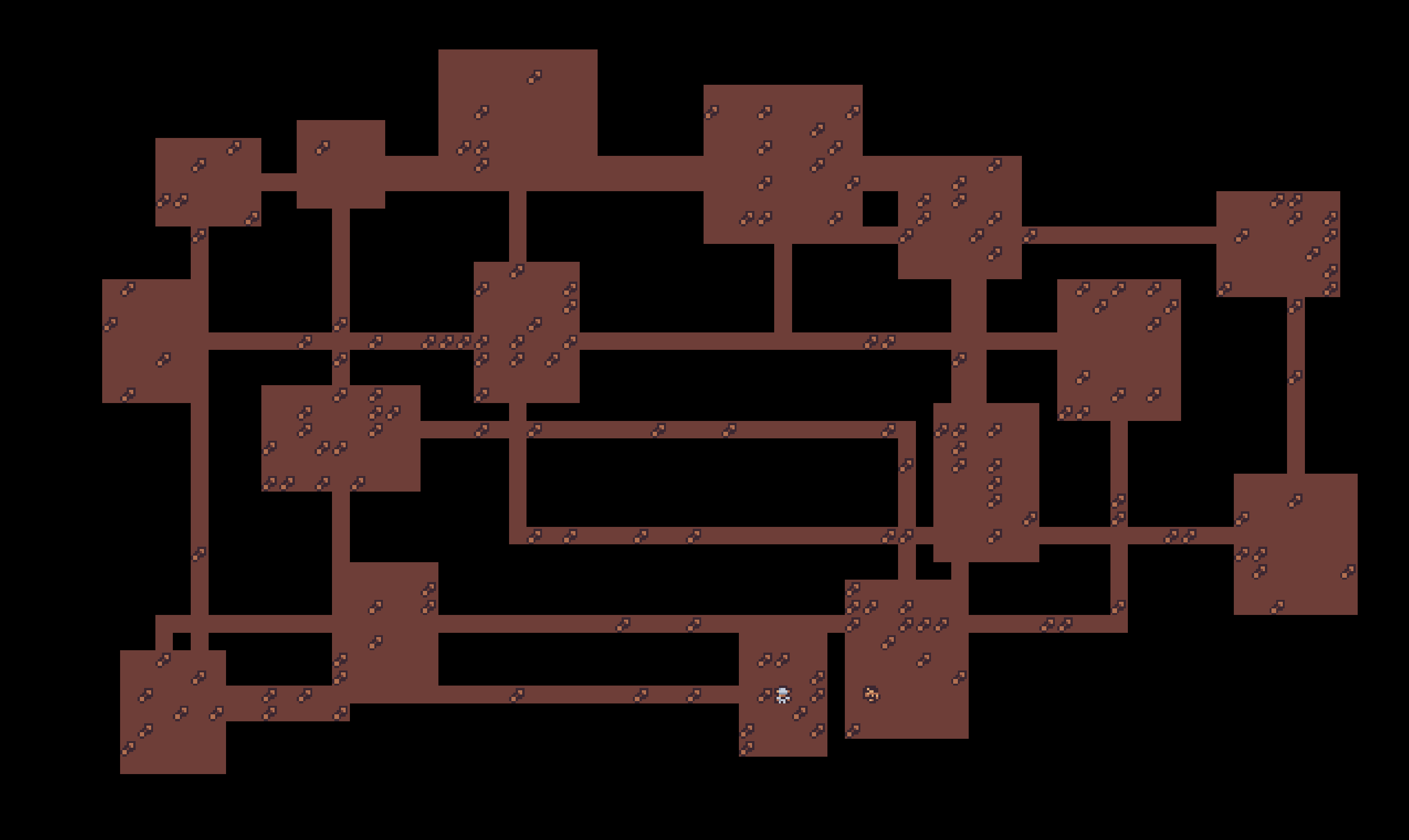
Right now our dungeon rooms exist in a black void and we can see every room regardless of whether or not we’ve actively explored it. In the next part, we’ll make the dungeon spookier by adding walls and implementing the player’s Field of View.
References
RefCounted: https://docs.godotengine.org/en/stable/classes/class_refcounted.html
Dependency in UML: https://www.uml-diagrams.org/dependency.html
UML Composition: https://www.uml-diagrams.org/composition.html
Rect2i: https://docs.godotengine.org/en/stable/classes/class_rect2i.html
Setters and Getters: https://docs.godotengine.org/en/stable/tutorials/scripting/gdscript/gdscript_basics.html#properties-setters-and-getters
Bresenham’s Line Algorithm: https://en.wikipedia.org/wiki/Bresenham%27s_line_algorithm
 Alex Shopov: EcoDevGuy